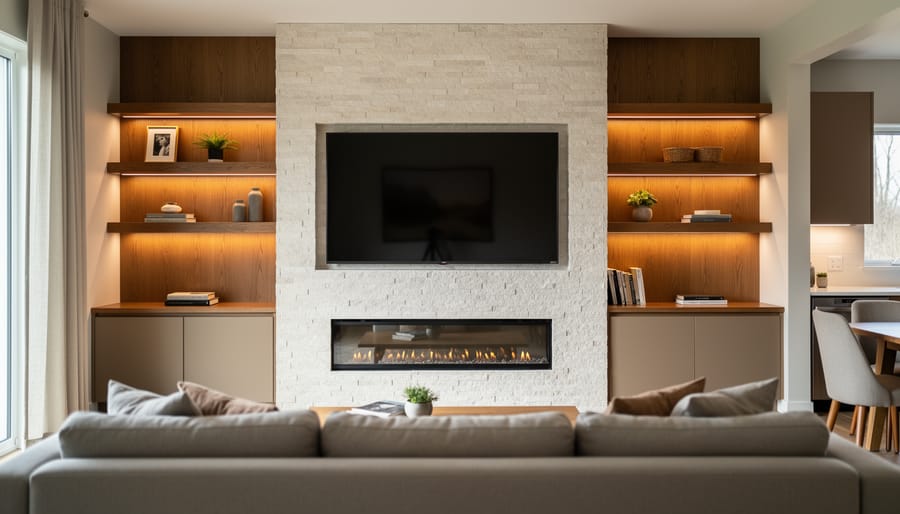
Your living room deserves a focal point that combines stunning design with everyday functionality, and a media wall delivers exactly that. This sleek, built-in feature transforms a basic TV setup into an architectural statement that anchors your entire space while solving storage headaches and cable chaos in one elegant solution.
Think of a media wall as your entertainment center evolved. Instead of a standalone TV awkwardly perched on a console, you’re creating a deliberate, integrated design element that balances your screen with carefully chosen materials like wood paneling, textured stone, floating shelves, or sophisticated cabinetry. The result feels intentional and polished, whether you’re streaming your favorite show or simply enjoying the room with the TV off.
The beauty of this project lies in its flexibility. You can go minimalist with a simple accent wall behind your TV, invest in a full floor-to-ceiling installation with hidden storage compartments, or land somewhere in between based on your budget and skill level. Modern media walls accommodate everything from traditional framed TVs to fully recessed screens that disappear into the design.
Getting started requires understanding three essential elements: proper TV height and viewing distance for comfortable watching, selecting materials and finishes that complement your existing decor, and planning the technical aspects like power outlets and cable management before construction begins. Whether you’re a confident DIYer ready to tackle the project yourself or gathering ideas for a professional installation, creating a media wall is more achievable than you might think—and the transformation it brings to your living space is absolutely worth the effort.
What Exactly Is a Living Room Media Wall?
Remember those bulky entertainment centers from the ’90s? The ones that tried to hide your TV behind cabinet doors, as if it were something to be ashamed of? Well, times have certainly changed. Today’s living room media wall flips that concept entirely, transforming your television and entertainment setup into an intentional, eye-catching focal point that you’ll actually want to show off.
So what exactly is a media wall? Think of it as the sophisticated evolution of those old-school entertainment units. A media wall is a custom-designed feature wall that thoughtfully integrates your TV, sound system, streaming devices, and gaming consoles with built-in storage, shelving, and decorative elements. Rather than your television awkwardly sitting on a stand or floating alone on a blank wall, it becomes part of a larger, cohesive design statement that ties your entire living room together.
The beauty of a media wall lies in its versatility. You might incorporate floating shelves to display your favorite books and plants, add concealed cabinets to hide tangled cords and clutter, or include accent lighting that creates ambiance for movie nights. Some designs feature rich wood paneling as a backdrop, while others use textured stone, sleek built-ins, or even a combination of materials that reflect your personal style.
What makes media walls particularly appealing for home improvement enthusiasts is that they solve multiple problems at once. They eliminate cable chaos, provide practical storage, create visual balance in your space, and turn what could be a black rectangle on your wall into an architectural feature that elevates your entire room. Whether you’re working with a small apartment wall or a spacious great room, a well-designed media wall adapts to your space while making a lasting impression.

The Science Behind Perfect TV Placement

Finding Your Ideal Viewing Distance
Getting the TV size and viewing distance right can make or break your media wall experience. Here’s a simple rule to follow: divide your viewing distance (in inches) by two to find your ideal TV size. So if your sofa sits 120 inches (10 feet) from the wall, a 60-inch TV hits that sweet spot.
For cozy spaces where you’re sitting 6-8 feet away, a 40-50 inch screen works beautifully without overwhelming the room. Mid-sized rooms with 8-10 feet of distance? Think 50-65 inches. Spacious layouts with 10-12 feet can easily accommodate 65-75 inch displays, especially when you’ve invested in comfortable theater seating options.
Remember, these guidelines work hand-in-hand with smart layout planning. Too close and you’ll strain your eyes following the action; too far and you’ll miss those crisp details you paid for. Before mounting anything permanently, try this trick: tape newspaper pages together matching your intended TV dimensions and stick them on the wall. Sit in your usual spot and see how it feels. This quick test can save you from costly mounting mistakes.
Getting the Height Just Right
Here’s the truth that might save your neck (literally): most people mount their TVs way too high. You’ve probably been to a friend’s house where you felt like you were watching a tennis match at the ceiling, right?
The golden rule is simple: the center of your screen should be at eye level when you’re seated. For most living rooms, this means the middle of your TV sits somewhere between 42 to 48 inches from the floor. Grab a tape measure and mark where your eye naturally falls while sitting on your couch—that’s your sweet spot.
A helpful trick? Tape a piece of cardboard cut to your TV’s size on the wall before you commit. Live with it for a day or two. Watch from different seats. Does it feel natural, or are you craning your neck? Trust your comfort over what looks “impressive.”
If you’re incorporating shelving or cabinets below your TV, remember to account for that height too. Sometimes the perfect placement means adjusting your furniture layout rather than compromising viewing comfort. Your future self, binge-watching your favorite series without neck strain, will absolutely thank you for taking these extra measurements seriously.
Accounting for Glare and Lighting
Nothing kills a perfect movie night faster than battling screen glare from windows or overhead lights. Before you install your media wall, take a full day to observe how natural light moves through your living room. Notice where sunlight hits at different times—that gorgeous morning light streaming through east-facing windows might create unwatchable glare on your screen by mid-afternoon.
The golden rule? Never position your TV directly opposite a window. If your room layout makes this unavoidable, invest in blackout curtains or adjustable blinds to give you control when needed. Consider the location of lamps and overhead fixtures too. Recessed lighting with dimmer switches works beautifully, letting you adjust brightness for viewing comfort.
Here’s a pro tip many homeowners overlook: LED strip lighting behind your TV creates ambient backlighting that reduces eye strain and actually minimizes perceived glare. This subtle glow also makes your media wall feel more intentional and polished.
Test your proposed TV location before finalizing anything. Sit in your usual viewing spots at different times of day and hold up a mirror where the screen will be. What reflects back shows exactly what glare you’ll experience. This simple trick can save you from costly repositioning later.
Designing Your Media Wall: Style Meets Function
Built-In vs. Modular Media Walls
When you’re ready to bring your media wall vision to life, you’ll face an important decision: should you go with a custom built-in design or opt for a modular system? Each approach has its own personality and practical considerations worth exploring.
Built-in media walls are like the tailored suit of home design—crafted specifically for your space and lifestyle. These permanent installations maximize every inch of your wall, creating seamless storage that looks like it was always meant to be there. The custom approach lets you incorporate unique features like hidden cable management, integrated lighting, and perfectly sized compartments for your equipment. Think of it as creating furniture that becomes part of your home’s architecture. The trade-off? Built-ins typically require professional installation and represent a bigger upfront investment, usually ranging from $2,000 to $10,000 or more depending on materials and complexity. They’re also permanent, so you’ll want to be confident in your design choices.
Modular systems, on the other hand, offer flexibility that many homeowners love. These pre-made units can be mixed, matched, and rearranged as your needs change. Moving to a new home? Your media wall comes with you. Want to refresh your layout? Simply reconfigure the pieces. Most modular systems are DIY-friendly and budget-conscious, with quality options starting around $500 to $3,000. The compromise is that they may not fit your space quite as perfectly as a custom solution, and you might see more visible seams and gaps.
Consider your timeline, budget, and how long you plan to stay in your home when making this choice.
Material Choices That Make an Impact
The materials you choose for your media wall can truly make or break the entire look. Think of them as the supporting actors that help your TV shine without stealing the show.
Wood paneling brings warmth and texture that softens the tech-heavy feel of a media wall. Horizontal slats create a modern vibe, while vertical boards can make your ceiling appear taller. You don’t need to cover the entire wall either—try flanking your TV with wood panels to create a frame-like effect that draws the eye naturally.
Stone veneer offers that luxury hotel feel without the hefty price tag or structural concerns of real stone. It works beautifully as a backdrop behind floating TV units, adding depth and visual weight that grounds your entertainment area.
For budget-conscious projects, don’t underestimate the power of paint and wallpaper. A bold accent color or textured wallpaper behind your TV creates instant drama. Consider painting the recessed area of a built-in unit in a contrasting shade to add dimension.
The key to success? Choose one statement material and let it breathe. Combining wood, stone, and bold wallpaper in one space can feel chaotic. Instead, pair your hero material with simple painted surfaces or clean drywall to maintain balance and keep your living room feeling cohesive rather than cluttered.

Balancing Your TV with Surrounding Elements
The key to a stunning media wall is embracing your TV as a design feature rather than treating it as an eyesore to hide. Start by creating visual balance through symmetry—flank your television with matching shelving units, cabinets, or even simple floating shelves at equal heights. This frames the screen beautifully and gives it purpose within the overall composition.
Consider incorporating a mix of open and closed storage to keep the look dynamic. Open shelves let you display decorative objects, books, and plants that add personality, while closed cabinets hide away media equipment, remotes, and those inevitable tangles of cords. The combination creates visual interest without clutter.
Think of your TV as the centerpiece rather than the enemy. Choose a wall color or material that complements the screen when it’s off—soft grays, warm woods, or textured panels work wonderfully. Add ambient lighting behind or around the TV to soften its presence during evening viewing.
The goal is cohesion. When every element feels intentional and balanced, your media wall transforms from a simple TV mount into a thoughtfully designed focal point that elevates your entire living room.
Smart Storage Solutions for Media Walls
A stunning media wall deserves equally smart storage solutions that keep your space looking polished while maintaining easy access to all your tech essentials. The secret lies in thoughtful planning that addresses both form and function from the start.
Cable management is your first priority. Nothing disrupts a sleek media wall faster than tangled cords snaking down your beautiful feature wall. Consider installing cable raceways or conduits behind your wall panels during construction. If you’re working with an existing wall, opt for paintable cord covers that blend seamlessly with your backdrop. Many homeowners find success with in-wall power kits that relocate outlets directly behind the TV, eliminating visible cords entirely. For gaming consoles and streaming devices, cluster them in a dedicated cabinet with a single cable pathway to your screen.
Built-in compartments transform your media wall from purely decorative to genuinely functional. Deep closed cabinets positioned at the base of your wall provide ample space for media players, gaming systems, and router equipment while maintaining ventilation through discreet back panels. Add wall shelves for storage on either side of your TV to display decorative items while concealing smaller devices like remote controls and headphones in stylish boxes or baskets.
Think vertical when planning storage. Tall cabinets flanking your TV offer substantial storage without consuming valuable floor space. Install adjustable shelving inside to accommodate devices of varying heights, and incorporate soft-close mechanisms for a high-end touch that prevents door slamming.
For maintaining that clean aesthetic, embrace hidden storage wherever possible. Drawer units with dividers keep remotes, charging cables, and game controllers organized and out of sight. Consider installing LED strip lighting inside cabinets with glass doors, creating an elegant display for your media collection while making items easy to locate during movie night. The key is balancing accessibility with visual calm, ensuring everything has its designated spot.
Common Media Wall Mistakes (And How to Avoid Them)
Even the most beautifully designed media wall can fall short if you stumble over some common planning mistakes. The good news? They’re all totally avoidable once you know what to watch for.
One of the biggest blunders is getting the measurements wrong. I’ve heard from homeowners who mounted their TV only to realize it sat awkwardly high or too far to one side. Before you commit to anything, measure twice (or three times!) and mark your wall with painter’s tape to visualize the actual size and placement. Remember to account for the TV mount brackets, which can add several inches to your depth calculations.
Another frequent misstep is ignoring electrical and cable management from the start. Nothing ruins a sleek media wall faster than visible cords snaking down your beautifully designed feature. Plan your power outlets, HDMI ports, and cable pathways before you begin construction. If you’re not comfortable with electrical work, hiring a licensed electrician is money well spent. Consider installing recessed outlets or conduit channels behind where your equipment will sit.
Many people also underestimate heat ventilation needs. Electronics generate warmth, and enclosed cabinetry without proper airflow can shorten the lifespan of your expensive equipment. Leave adequate space around devices and consider adding ventilation grilles to closed storage areas.
Finally, don’t forget about future flexibility. Technology changes quickly, so avoid permanently fixing every element. Use adjustable shelving and accessible cable runs that allow you to swap out devices without major renovations. Building in some adaptability now means your media wall will serve you well for years to come, even as your tech needs evolve.
Planning Your Media Wall Project: A Step-by-Step Approach
Ready to turn your media wall dreams into reality? Let’s break down the planning process into manageable steps that’ll set you up for success.
Start by measuring your space carefully. Grab a tape measure and note the wall’s width, height, and depth. Don’t forget to measure the distance from your primary seating area to the wall, as this determines your ideal TV size. A good rule of thumb is that your viewing distance should be about 1.5 to 2.5 times your TV’s diagonal screen size. Mark electrical outlets, cable connections, and any existing features like radiators or windows on a rough sketch.
Next, establish your budget early on. Media walls can range from a few hundred dollars for a simple floating shelf setup to several thousand for a full custom installation with built-in cabinetry and professional finishing. Be realistic about costs including materials, any electrical work, and installation. Remember to set aside an extra 10-15 percent for unexpected expenses because, let’s face it, surprises happen during home projects.
Now comes the big decision: DIY or hire a professional? If you’re handy with basic tools and your design is relatively straightforward, like mounting floating shelves or installing prefabricated units, DIY can save substantial money. However, projects requiring electrical rewiring, gas work around fireplaces, or complex custom carpentry typically warrant professional help. There’s no shame in hiring experts for parts of the project while tackling simpler elements yourself.
Create a timeline that accounts for ordering materials, delivery windows, and actual construction time. Most media wall projects take anywhere from a weekend for simple installations to several weeks for elaborate custom builds.
Finally, gather inspiration images and create a vision board. This helps you communicate your ideas clearly, whether you’re working solo or with contractors. Pin down specifics like color schemes, material finishes, and storage needs before making any purchases. This preparation phase might feel lengthy, but it prevents costly mistakes and ensures your finished media wall perfectly matches your vision.
Creating a media wall is one of the most rewarding ways to improve your living room, transforming it into a space that’s both stylish and supremely functional. As you’ve explored throughout this guide, a well-planned media wall does so much more than just house your television—it becomes a stunning focal point that elevates your entire entertainment experience while bringing cohesion and personality to your space.
Remember, there’s no need to rush this project. Take your time measuring, visualizing, and selecting materials that truly reflect your style. Whether you’re drawn to sleek minimalism, warm textured finishes, or bold statement designs, your media wall should feel uniquely yours. Sketch out your ideas, create mood boards, and don’t be afraid to mix inspiration from various sources to create something special.
The beauty of this project lies in its potential to completely reimagine how you use and enjoy your living room. So gather your measurements, trust your creative instincts, and embark on this exciting transformation with confidence. Your dream media wall is closer than you think!